Mojo fails to install directly on Kali Linux and requires ‘UV venv’ on UV installation which is not listed in the official page installation guide-yet after succesfull installation the VS Code IDE Mojo package allows code to be typed but fails to run it as “No SDK” yet the UV virtual environment for Mojo,Mojo and MAX have all successfully installed. Pixi also fails in a direct installation. And the compiler fails to list the errors in the code(which i deliberately wrote them on this second screenshot at runtime and on the first displays UV failing to install. Do any folks have solutions for this??


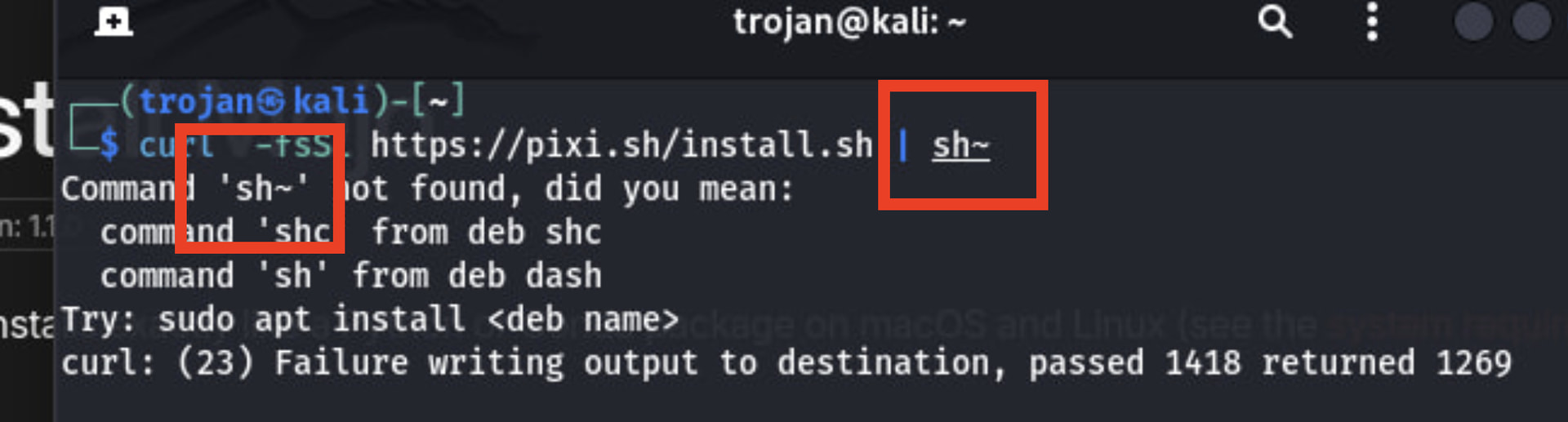
I could be wrong but it looks like in your first pixi attempt you called “sh~” instead of just “sh”. I wonder if you try again with just “sh” if the pixi will work for you!
Do you perhaps mean UV? Pixi didn’t work but UV did work . The real problem is on the SDK.
The Major reason i prefer Kali linux is measly because I’m handling some really awesome CyberSecurity projects on Adversarial Machine Learning. Yet i think Mojo is pretty good for this.
@Autark_pseudo I mean that in your screenshot it looks like you may have accidentally typed sh~ instead of sh. See screenshot. If you type “sh” instead, pixi may still work for you? I’m not totally sure though, just a guess.

Unfortunately I haven’t worked with “uv” just “pixi”… but when I work with pixi, I need to:
- Create the virtual pixi environment (using
pixi init) - Then activate the virual pixi environment (using
pixi shell) - Then add the mojo package (using
pixi add mojo)
Since the “mojo” compiler and “mojo-lsp-server” binaries get loaded into "<my-project>/.pixi/envs/default/bin/mojo-lsp-server", then the LSP won’t work unless I activate the virtual environment with “pixi shell”, because doing that adds the “.pixi/envs/default/bin” directory into my path.
These errors in your first message make it sound like your “uv” environment is not activated, so $PATH has not been updated to include your virtual environment’s “mojo-lsp-server” binary. Have activated the “uv” environment?

Do any folks in the community have a way to activate UV environment. I was wondering why this was never added to the official page installation guide. Since the $PATH setup for the SDK is the root cause there should be a way to setup a perfect environment on my Kali machine?
Previous citings on UV Installation do not seem like much in both the Discourse Forum and Github. but i found a relevant post that might touch on UV Installation.
I wonder if folks like @owenhilyard who have worked on Ubuntu before can give a solid answer to this?
We should add this to the docs, but the minimum steps should be
uv venv
source .venv/bin/activate
uv pip install mojo
This makes sure you (a) have the venv active, (b) that Mojo gets installed to said venv, and (c) the LSP gets detected.
One key difference between uv and pixi is that uv defaults to a global install, but seems to still warn you. pixi defaults to a local install, but you can do a global install if you want (though I don’t know if the VSCode extension will work with it, would have to check).
Well it should have been expected to work perfectly but the VS code extension still says the No SDKthing.
Using CPython 3.14.7 interpreter at: /usr/bin/python
Creating virtual environment at: .venv
✔ A virtual environment already exists at `.venv`. Do you want to replace it? · yes
Activate with: source .venv/bin/activate
Resolved 9 packages in 1.55s
Prepared 1 package in 126ms
Installed 9 packages in 66ms
 + click==8.5.0
 + mblack==26.6.0
 + mojo==1.1.0
 + mojo-compiler==1.1.0
 + mojo-compiler-mojo-libs==1.1.0
 + mojo-lldb-libs==1.1.0
 + mypy-extensions==1.1.0
 + pathspec==1.1.1
 + platformdirs==4.12.1
This is the ouput .
I don’t know the inner workings of the VSCode extensions super well, but I think you’ll want to double check that
- You have the venv selected in the Python extension.
- The file
.venv/bin/mojo-lsp-serverexists
If those are true, you might just need to restart the extension. Let me know if that works.
@ahajha Everything should be working out well as of now-based on this screenshot:

Since VS code can now read the LSP. The major problem was on the VS code extension restrictions however the LSP is working abit too slow compared to normal speeds in Debian. However if you see any problem just point it out.
I think this file already exists. It shouldn’t be part of the uv install packages should it?
I don’t know of any reason why the LSP would be slower on Kali than on any other distro.
mojo-lsp-server is installed in your case via the mojo package, not sure what you mean by “already exists”.